
headcount365 vs spreadsheets
Your hiring plan has outgrown the spreadsheet
A spreadsheet is a good place to model headcount. It’s a hard place to run it. Every request, approval, offer, and departure has to be typed in by someone, and by the time it’s right, it’s out of date. headcount365 keeps the plan current from the systems you already use.
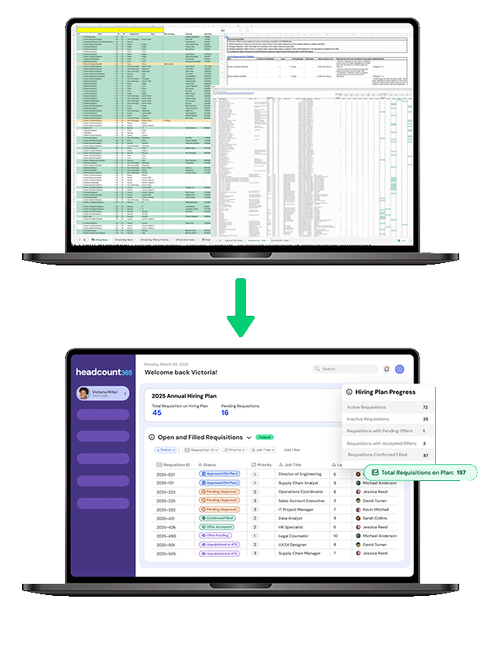
The question isn’t whether a spreadsheet works. It’s how much of your week goes into keeping one right.
Same job, two ways
Six moments that break a spreadsheet
None of these are rare. Most hiring plans see all six every month.
- 01
A manager needs a new role
In a spreadsheet
They message Finance. Someone adds a row, the approval lives in an email thread, and nobody can find it in March.
In headcount365
They fill in a request form. It routes to the right approvers with its budget impact, and the approved role lands in the plan with its full history.
- 02
A start date slips
In a spreadsheet
The cell stays the same until someone notices. Until then, the forecast counts a salary that won’t start for months.
In headcount365
Recruiting progress comes in from your ATS, so expected start dates move as the role moves, and each change is recorded with its reason.
- 03
An offer comes in above plan
In a spreadsheet
Finance finds out at month end, when payroll doesn’t match the model.
In headcount365
The accepted offer syncs from your ATS and sits next to the plan and the HRIS record, so a difference shows up the day it happens.
- 04
Someone resigns
In a spreadsheet
Their seat quietly disappears from the sheet until someone remembers to add a backfill row.
In headcount365
The departure comes in from your HRIS as a vacant seat, ready to backfill or close, with the role’s details already filled in.
- 05
The board needs numbers by Thursday
In a spreadsheet
Export from three systems, paste into one file, reconcile the versions, and hope nothing changed overnight.
In headcount365
Budget, plan progress, and variance reports are built in, from the same data every team uses. Save the view or schedule it.
- 06
Who can see salaries
In a spreadsheet
Everyone with the link sees every column, or you maintain a separate copy for each audience.
In headcount365
Access is set by role: each person sees only the departments and fields they’re allowed to, in one shared plan.

What a spreadsheet can’t tell you
The answers your team keeps asking for
A spreadsheet holds today’s numbers. It can’t tell you how they got there, and that’s usually the question Finance, HR, and Recruiting are asking.
- Who changed it, and why: every change to every role is recorded with who made it, when, and the old and new values.
- Whether it was approved: each role carries its approval chain, so nobody has to dig through email.
- Which version is current: there’s one plan, not a folder of copies named final_v7.
- Whether hires matched the plan: accepted offers and new hires are checked against the plan automatically.
Keep your spreadsheet
Model in Sheets or Excel. Run the plan in headcount365.
You don’t have to give up the spreadsheet. headcount365 sends the latest plan to Google Sheets or Excel every night, and on demand, so your models and lookups always start from current numbers.
An honest take
When a spreadsheet is still enough
If one person owns the plan, a handful of roles open each year, and nobody else needs to see it, a spreadsheet can do the job. headcount365 earns its place when:
- Several teams change the plan
- Hiring runs through an ATS and people data through an HRIS
- Finance needs the plan to match offers and payroll
- Approvals need a record someone can audit
Switching
Leave the spreadsheet in three steps
Your existing plan comes with you, so nothing is retyped and nothing is lost.
Bring your spreadsheet in
Save your current plan as a CSV and import it. A test run checks every row before any requisition is created.
Connect your systems
Link your ATS, HRIS, and FP&A tool so the plan updates itself from then on.
Go live with help
Every customer gets an implementation manager and a 12-week window, and most go live in four to six weeks.
From teams who switched
Out of the spreadsheet, for good
“headcount365 is a single source of truth spreadsheets simply couldn’t deliver, bringing real proactivity and transparency to our hiring process.”
Dave GovertVP, Talent Acquisition, PatientPoint “headcount365 has helped us remove a lot of manual work and get us out of spreadsheets and into one centralized tool.”
Kaitlyn ButlerRecruiting Operations, Planet Labs “headcount365’s seamless integration & tailored workflows means never manually tracking another headcount request in a spreadsheet.”
Jill McCarthySr. People Operations Analyst, CarGurus
Common questions
Why use headcount365 instead of a spreadsheet?
A spreadsheet only knows what someone typed into it. headcount365 keeps the hiring plan current from your ATS and HRIS, routes every request through approvals, records every change, and gives each team its own permissioned view of the same plan.
Can we keep using Google Sheets or Excel?
Yes. headcount365 sends the latest plan to Google Sheets or Excel every night and on demand, so your models keep working from current data.
How do we move our current spreadsheet into headcount365?
Save it as a CSV and import it. A test run checks every row first, then requisitions are created or updated in bulk.
How long does switching take?
Every customer gets an implementation manager and a 12-week implementation window. Most go live in four to six weeks, with their HRIS, ATS, and FP&A tool connected.
Does headcount365 replace our ATS or HRIS?
No. Your ATS still runs recruiting and your HRIS still holds employee records. headcount365 sits between them and keeps the hiring plan in agreement with both.
Is headcount365 worth it for a small team?
If one person owns the plan and few roles open each year, a spreadsheet may be enough. headcount365 pays off when several teams change the plan and Finance needs it to match offers and payroll.
See your plan outside the spreadsheet
Bring your current spreadsheet to a demo, and we’ll show you what it looks like in headcount365.