
REAL TIME HEADCOUNT DATA VISUALIZED
Org Chart Software with Every Headcount Tracked
Budget owners, finance, HR and Recruiting all work from the same dataset, creating the most accurate headcount visual of any software
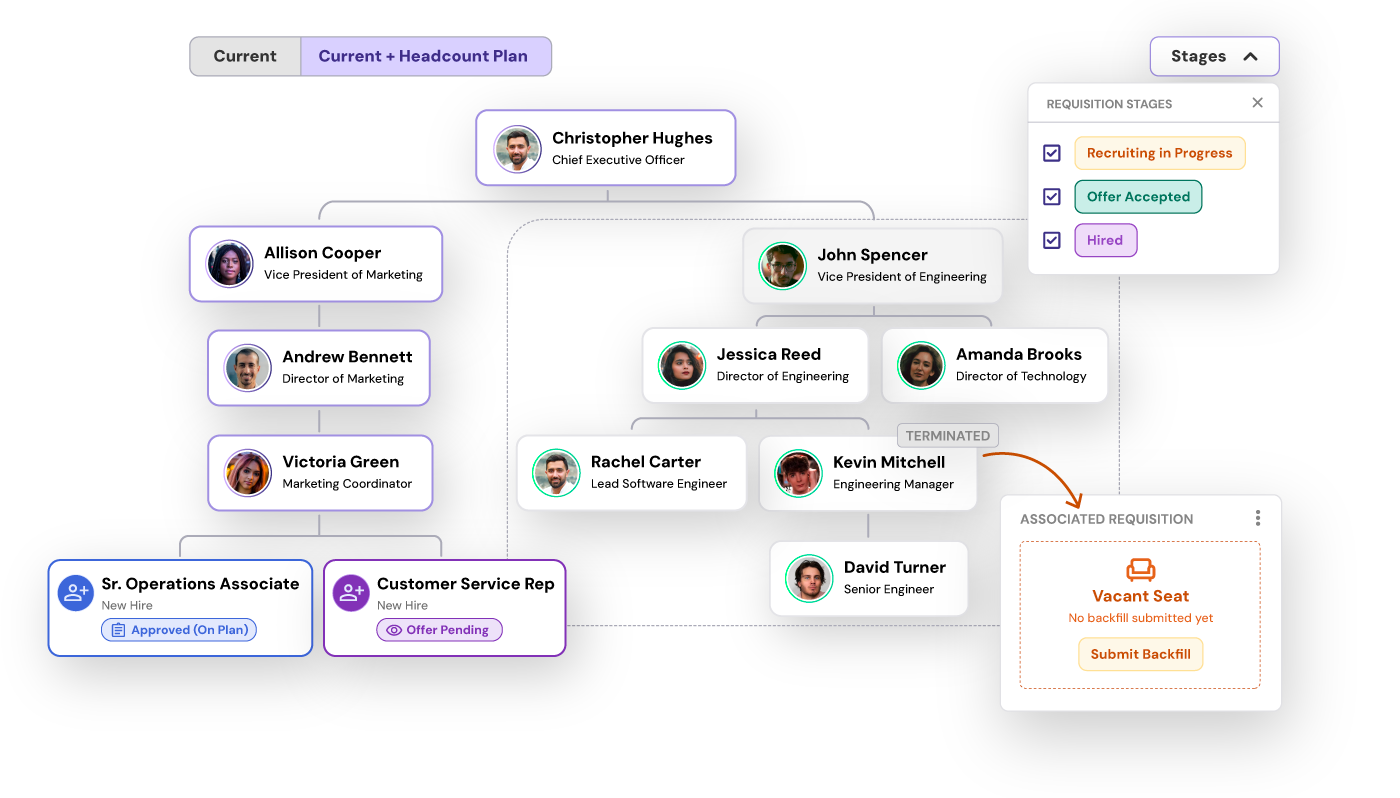
NOT JUST HRIS DATA
Unite Filled Seats and Open Reqs in One View
Eliminates Workforce Blind Spots: Unifying active employees and planned requisitions gives leaders a complete, real-time view of true organizational capacity.
Accelerates Strategic Decision-Making: Visualizing open roles alongside reporting hierarchies enables faster, more accurate headcount allocation and span-of-control adjustments.
Aligns HR, Finance, and Talent Acquisition: A single source of truth prevents budget disconnects by keeping all stakeholders operating from the exact same headcount plan.

AN ALWAYS-LIVE ORG CHART
Real-Time Headcount Intelligence, Not Static Snapshots
Unlike legacy solutions that rely on delayed system snapshots or ignore your hiring plan altogether, Headcount365 updates your visual hierarchy continuously in real time. This ensures your org chart always reflects the true reality of your entire workforce—no matter how fast your teams, requisitions, or business priorities evolve.
Unified View (Existing Employees + To Be Hired): Map active employees alongside approved requisitions and future openings in one visual org chart. Eliminate headcount blind spots by seeing current operational capacity and upcoming headcount commitments simultaneously.
Vacancy Management: Track attrition rates, open role statuses, and backfill progress across departments. Instantly spot unfilled positions and monitor how long critical roles remain vacant.
Request & Modify Headcount: Submit backfills, duplicate existing role structures, and request new positions directly inside the org chart interface. Streamline workforce changes without leaving your visual planning canvas.
Customizable Views: Create, save, and export filtered views tailored to specific business needs. Group, filter, and sort your org chart by workforce status, department, cost center, location, or management tier.
Customizable Cards: Tailor the data points displayed on each organizational card. Add job codes, salary bands, start dates, employment status, key performance metrics, or custom metadata to fit your workflow.
Span of Control: Analyze organizational balance at a glance. Review direct reports, total roll-up headcount, and reporting lines for every manager to eliminate operational bottlenecks and optimize span of control.
heacount365’s Org Chart FAQ
-
Standard org chart software pulls data from an HRIS to build a static snapshot of active employees. Headcount planning org chart software integrates active employee data with your recruiting pipeline (ATS) and financial forecasts, allowing you to visualize open positions, planned hires, backfills, and structural scenarios alongside active staff in real time.
-
Headcount365 connects directly to your applicant tracking system (ATS) and headcount management pipeline to automatically create placeholder cards for open requisitions and planned roles. These cards sit directly within the reporting hierarchy alongside active employees, displaying key details like target start date, hiring stage, and role owner.
-
Modern org chart software like headcount365 utilizes automated bi-directional integrations with HRIS tools (e.g., Workday, BambooHR, Rippling) and ATS platforms (e.g., Greenhouse, Lever). As employees join, switch teams, or exit, or as requisitions open and close, the org chart updates instantly without manual manual chart rebuilding or file uploads.
-
Standard cards display basic attributes like full name, role title, department, and photo. For strategic workforce management, advanced cards can be customized to display compensation bands, location/time zone, cost center, reporting manager, vacancy status, requisition ID, and span-of-control rollups.
-
Headcount365 integrates bi-directionally with your existing HRIS (e.g., Workday, BambooHR, Rippling), ATS (e.g., Greenhouse, Lever), and financial planning tools. By syncing active employee records alongside approved requisitions and budget data in real time, it automatically compiles your entire workforce hierarchy into a single visual org chart, eliminating manual spreadsheet exports and cross-department data mismatches.
-
Headcount365 allows leadership teams to reassign reporting lines, adjust management tiers, and reallocate headcount directly within the interactive org chart interface. As you modify reporting structures on the canvas, the software automatically recalculates manager span-of-control metrics and roll-up team costs, making it easy to spot operational bottlenecks and optimize org structure in real time.
-
Yes. Headcount365 offers sandbox scenario modeling, allowing HR, Finance, and executive teams to build and collaborate on draft org charts in a private environment. You can test proposed restructures, future hiring plans, and budget shifts side-by-side without altering your live operational hierarchy until changes are fully approved.
Ready to take control of your headcount data?
