
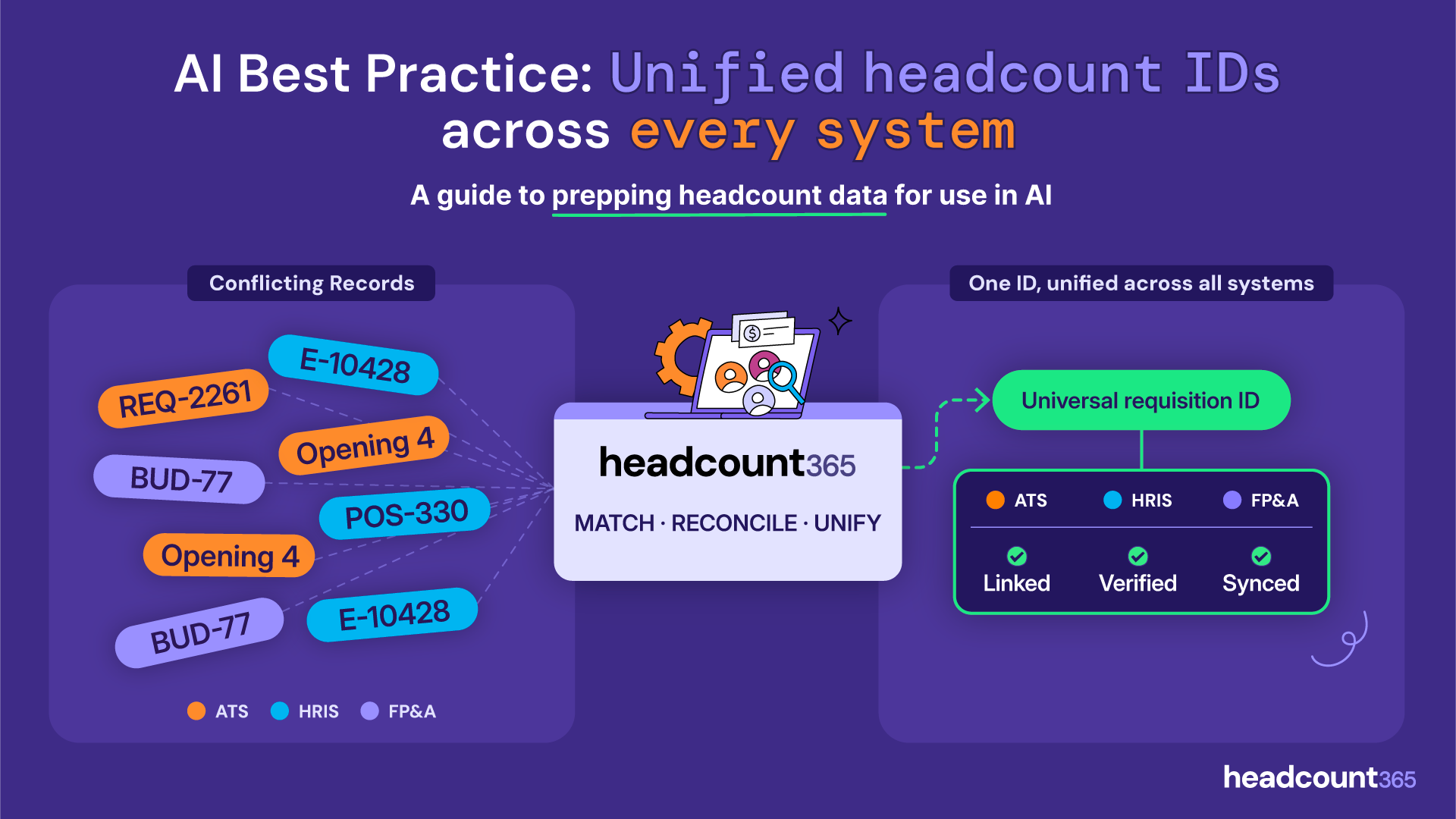
AI Best Practice: Unified headcount IDs across every system
A guide to prepping headcount data for use in AI by Headcount365 (Match · Reconcile · Unify).
| Source System | Conflicting Record ID | Record Details | Unified Result | System Status |
|---|---|---|---|---|
| ATS | REQ-2261 | $185,000, L5 | Universal Requisition ID | Linked |
| ATS | Opening 4 | Net new | Linked | |
| HRIS | E-10428 | $142,000, L3 | Verified | |
| HRIS | Opening 4 | Backfill | Verified | |
| FP&A | BUD-77 | $210,000 budget | Synced | |
| FP&A | POS-330 | L4, 15% variable | Synced |
Table of Contents
Why does a Headcount ID Matter?
Without a unique ID to track headcount from pre-hire, hire, through employment, termination & backfill, it’s difficult to track the evolution of business-critical data.
Headcount365 is the first system that creates a Universal Headcount ID across the headcount plan, the FP&A system, HRIS and ATS, linking all ID types for all use cases. This is incredibly important to building the dataset AI needs to ingest headcount data into automations, dashboards and reports. Without it, the AI has to “hallucinate” through duplicate records and multiple use cases.
Ask a Finance leader what a "requisition" is and you'll hear: a line in the budget that has been approved to spend. Ask a Recruiting leader the same question and you'll hear: a job that's open and being worked on right now. Ask an HRIS admin and you'll hear: a position record that a person will eventually be attached to.
There are two types of headcount IDs in every system
Every object in every system actually has two identifiers a UUID and a display ID.
The UUID - A hidden code used by systems to identify records
A long machine-generated string; something like 9f8e7d6c-5b4a-3210-fedc-ba9876543210. Your ATS has one for every job. Your HRIS has one for every position. It never changes, and you almost never see it. It's usually available through the API, which is good news for us but not something you need to touch.
The display ID - The human readable identifier for a record
The human-readable one: REQ-2291, Opening 4, E-10428. This is what your team puts in spreadsheets and pastes into Slack. It's what you'll be working with. Here's the catch, and it's the single most useful thing to know going in:
Display IDs are not guaranteed to be unique.
Some ATS platforms number openings starting at 1 under every job, so "Requisition-002" exists a hundred times over. Spreadsheets will happily let you type the same ID into fifty rows. Some HRIS systems recycle employee numbers after someone leaves. When you're matching, don't assume an ID is a unique key just because it's an ID. If your ATS numbers the openings within a job, then "Opening 2" is meaningless on its own. You need the job it belongs to. The position it falls under. The budget code from Finance. The Seat ID in the org chart.
A breakdown of IDs by individual system & team
Individual teams use IDs for work outside of managing headcount. In the ATS, it’s not uncommon for recruiters to open one role in multiple locations to see which candidate is best. The ATS generates it’s own ID, but it doesn’t correlate back to a budget ID for finance. Teams also have process workarounds for speculative or confidential roles. In the HRIS, it’s not uncommon
ATS IDs
Job ID: The posting itself, the thing candidates apply to
Opening ID: A specific slot under that job; one job posted for 5 AEs might have 5 openings
Requisition ID: The approval to hire; some ATS platforms use this word for the job, some for the opening, some don't use it at all
In the HRIS, IDs can be recycled when employees are terminated or hired. When managers request backfills, they’ll often create a new Seat ID rather than a second position ID associated to the seat of their outgoing employee. Terminations who will not be replaced sit open as vacant seats rather than being dispositioned from the org chart.
HRIS IDs:
Employee ID: Tied to the person and typically not reused once consumed
Seat ID: Tied to the funded slot, whether or not someone's in it. Often reused, especially with roles with high attrition & backfill
Position ID: Tied to the seat, this is the position number that’s filling the seat. Sometimes unique
In your FP&A model:
In the FP&A tool, budget IDs can be reused across positions, particularly in cases where 2 backfills are replacing 1 more expensive employee. Scenario plans create temporary budget IDs that are difficult to link to other systems.
Budget ID: Tied to allocated dollars, not to a person or a job
Create a headcount source of truth with headcount ID mapping
Every approval, reconciliation, and forecast requires a unified way to uniquely identify siloed parties. For your ATS, work from your most recent hiring plan export from your FP&A tool. For every requisition on it, find the corresponding job opening in your ATS and record its ID in a new column. For your HRIS, pull all vacant position and seat IDs and match these openings to active backfills on the hiring plan. Vacancies without a backfill should be reconciled with FP&A to see if that seat still exists to be filled.
The hiring plan is the best place to start, since it can be the source of the most variance. The most accurate way is at the job opening level. Most rows will be straightforward. This guide covers what you need to know to do it well, and how to handle environments that have sub-optimal data quality.
How to map headcount IDs in your ATS
1) Your ATS uses openings and you use them too
You're in the best position. Match each tracker row to a single opening ID. This creates a 1:1 match of everything in your hiring plan against everything in your ATS. Anything in the ATS that doesn’t have a corresponding ID on the headcount plan needs action. While we recommend as little “noise” in the ATS as possible, we understand teams have use cases to do so (testing the same job in multiple places, or with multiple titles)
One thing to check: does your ATS number openings uniquely across the whole system, or restart the count within each job? If it restarts, record the job ID alongside the opening ID. The pair is your identifier, neither half works alone.
2) If your ATS has openings but you don't use them
Common, and workable. What matters is how your team has been posting jobs.
If you create a separate job for every hire, the job ID does the same work an opening ID would. Match to it and note in your tracker that you're matching at the job level.
If you post one job and hire several people from it, there's no identifier that distinguishes the second hire from the fourth. Both live under the same job ID, and nothing in the ATS tells them apart. Flag these rows rather than guessing. There are a few reasonable ways to handle it turning openings on going forward, splitting the job, or agreeing on a convention in the tracker and the right one depends on your ATS and your recruiting team's workflow. Bring the list to your kickoff and we'll work through it.
3) If your ATS doesn't have openings at all
Same approach as above. Match at the job level using titles, departments and cost centers to triangulate individual openings back to a budget object on the hiring plan. Flag any job that covers more than one hire. Align the total number of openings for each job on your headcount tracker, and assign the IDs in the ATS later.
4) If a tracker row has no ATS counterpart
Leave it unmatched and note why. This is legitimate and more common than people expect: roles budgeted but not yet released to recruiting, seats held for an acquisition, contractors, backfills that haven't been opened yet. Forcing a match to the nearest-looking job creates a wrong link, which is worse than an honest blank.
5) If you find an ATS opening with no tracker row
Write it down separately. This one matters. It's either hiring that was never on the plan, or hiring that was approved but never made it back into the tracker and either way it's the finding that tends to be worth the most money. Most teams find at least one.
Three things to watch for when mapping headcount IDs
Headcount ID Duplicates The same opening or job ID matched to two different tracker rows. Usually means one hire got counted twice, or two rows are actually the same requisition entered by different people.
Rows tracked by name instead of ID. Jordan's backfill, "the second sales hire - open." These work fine for a person who's been in the room all year and not at all for anything else. These rows need the most attention. The connection to the ATS exists only in someone's memory right now.
Splits and merges. One budgeted position that became two roles, or two that consolidated into one. When you hit these, record both the current state and what it was before. The history is what makes the budget reconcile later.
What a mapped headcount ID system looks like
You need it to be honest, not perfect. With headcount365, it can be both.
Every tracker row has either a matched ATS ID or a note explaining why it doesn't
Where opening IDs aren't unique across your ATS, you've recorded the job ID too
Duplicates are flagged, and ideally resolved via reconciliation
You have a separate list of ATS openings that don't appear on the tracker
Rows tracked by name rather than ID are marked so we know to look at them
A tracker with twenty flagged rows and clear notes is far more useful to us than one with twenty confident guesses. The flags tell you where your systems actually diverge, which is the information we need to build your mapping correctly the first time.
headcount365 is an automated, universal headcount ID management tool
The headcount ID mapping exercise above is worth doing whether you use headcount365 or not. You'll find duplicate records, unapproved openings, and rows nobody can account for, and those are worth finding once. If after you’ve done this exercise you decide you want headcount365, this exercise will reduce implementation time 10 fold, as the main blocker to go-live is this data cleanup.
A single ID that follows a headcount from budget line to open req to hire to termination to backfill is what turns four disconnected lists into one dataset. Finance can see which openings their dollars are actually funding. Recruiting can see which roles were approved and which weren't. HR can see a backfill as a continuation of a seat rather than a new record with no history. And when you point AI at it for forecasting, variance analysis, or a dashboard nobody has to rebuild each quarter, it has something to reason across instead of duplicate records it has to guess between. That's the difference between headcount data you report on and headcount data you can actually use. headcount365 builds and maintains that layer for you, so the mapping holds after the reorg, the backfill, and the ATS migration.